POST Reserving a time
Reserve specific time for your customers.
This endpoint allows one to reserve a timeslot, blocking others from booking it, for specified amount of time. When the duration passes, the time slot is “released” back and made available again, unless it is converted into a booking. The duration amount is customizable on the “Project'' Level.
Step-1: Configure Reservation Duration on Project
To reserve a time or slot you first need to configure your project with a default reservation time. You can also change this at any time.
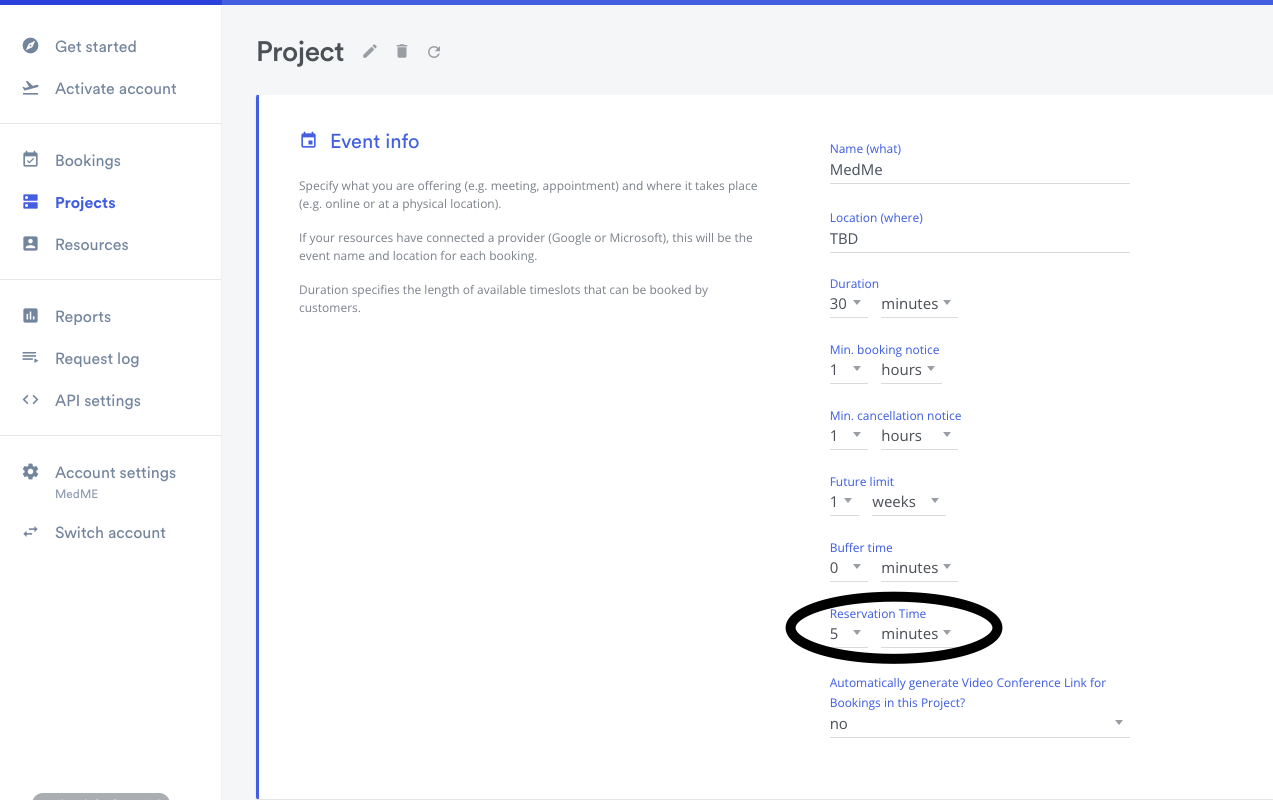
Step-2: Send reservation request
Using v2/bookings/reserve endpoint send a request to reserve a time slot for specific duration. Once time slot is reserved your users wont be able to book this reserved time slot.
To create a booking for reserved time you must use the booking endpoint and pass a field called reservation_id which is the id returned from this v2/bookings/reserve endpoint. The booking is created with the instant graph, and any of start, end, resource_id, what, where and description you leave out are copied from the reservation. Customer details saved on the reservation are also used, and take precedence over the same fields in the booking request. An unknown or expired reservation_id is rejected with a 400.
Endpoint
POST https://api.timekit.io/v2/bookings/reserve
Parameters
| Name | In | Type | Required | Default | Description |
|---|---|---|---|---|---|
reservation_time |
body | int | yes | Amount of time in seconds to reserve for given time slot. Minimum 60. Optional when project_id points to a project with a reservation time set; the project's value (in minutes) is then used. |
|
start |
body | string | yes | When the booking starts. Must not be in the past. | |
end |
body | string | yes | When the booking ends | |
project_id |
body | string | If you want to use the settings specified in the project. Any additional parameters in the request will override those set in the project | ||
resource_id |
body | string | yes | The ID of the resource being booked | |
what |
body | string | yes | The title of the booking | |
where |
body | string | yes | A description of the location of the booking | |
description |
body | string | yes | a description of the booking | |
customer |
body | object | yes | Customer info, the customer is the person booking the resource. customer.name is required; email, voip and timezone are optional. |
|
graph |
body | string | yes | Must be a valid graph name. The reservation always uses the reservation graph, whatever value you send. |
Request examples
The dates in this example are in the past; use a future start in a real request.
json{
		"reservation_time": 1200,
		"start": "2018-08-12T21:30:00-07:00",
		"end": "2018-08-12T22:15:00-07:00",
		"graph": "instant",
		"resource_id": "a6fc1bdb-8035-4007-919b-6276b9124eb8",
		"customer": {
				"name": "Marty McFly",
				"email": "marty.mcfly@timekit.io"
		},
		"project_id": "f7df8e1e-f04b-4e3f-9376-ed82b41f4036",
		"what": "Catch the lightning",
		"where": "Courthouse, Hill Valley, CA 95420, USA",
		"description": "Reservation"
}
Response examples
201
json{
    "data": {
        "id": "af058e2f-5e59-43ee-b1e3-7f3a82b2a1d5",
        "state": "reserved",
        "graph": "reservation",
        "completed": true,
        "created_at": "2022-06-06T13:17:15-0400",
        "updated_at": "2022-06-06T13:17:15-0400",
        "rsvp": "accepted",
        "what": "Reservation for Vaccine",
        "where": "TBD",
        "description": "",
        "allDay": false,
        "end": "2022-06-06T03:30:00-0400",
        "start": "2022-06-06T03:00:00-0400"
    }
}