POST Dates
Endpoint that returns all available dates for given resource.
This TimeKit feature is very useful when you are searching for dates available for your resources. Let say that you want to search dates when your resource is available between two dates.
Date Availability by Project
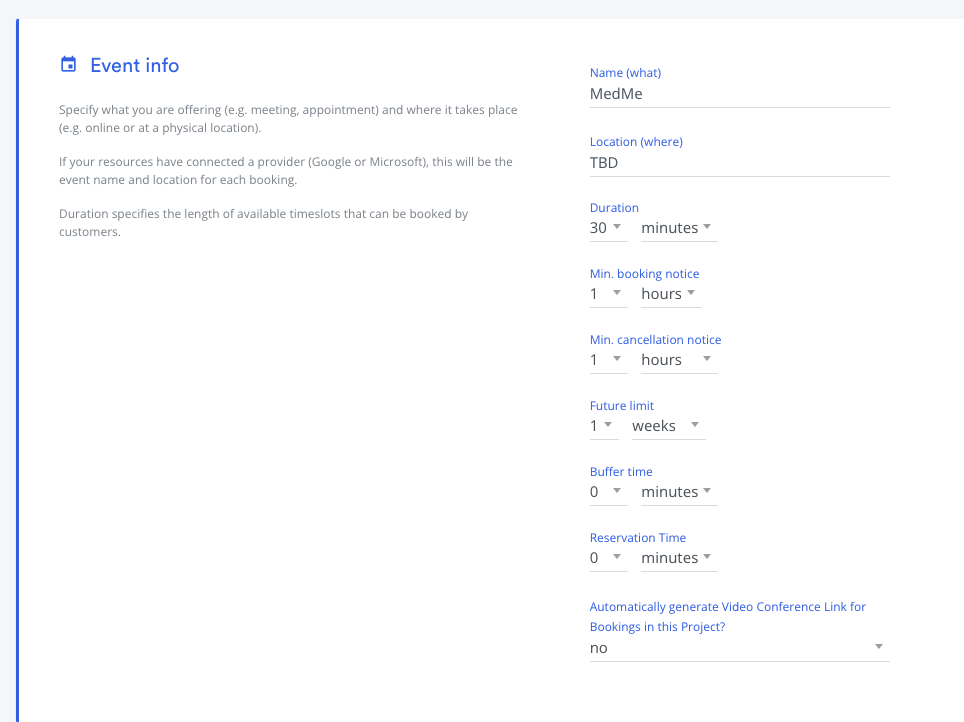
Let say that you have a project with following settings. length: 30 min duration with 1 week future limit.
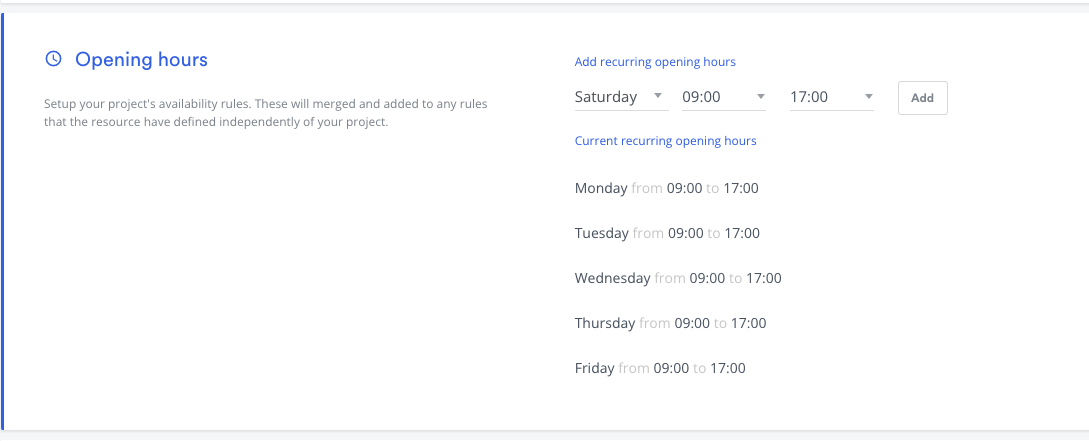
Let say that you have following opening hours are set on your project. Monday to Friday 9 to 5PM.
In above case when you run following request payload without to/from date. from will be set to now (i.e. today is June 10) and to will be set to 1 week of limit according to your project future limit.
Request
json{
    "project_id": "f7df8e1e-f04b-4e3f-9376-ed82b41f4036",
    "resources": [
        "a6fc1bdb-8035-4007-919b-6276b9124eb8"
    ]
}
Response
json{
    "data": [
        {
            "date": "2022-06-10",
            "resources": [
                "a6fc1bdb-8035-4007-919b-6276b9124eb8"
            ]
        },
        {
            "date": "2022-06-13",
            "resources": [
                "a6fc1bdb-8035-4007-919b-6276b9124eb8"
            ]
        },
        {
            "date": "2022-06-14",
            "resources": [
                "a6fc1bdb-8035-4007-919b-6276b9124eb8"
            ]
        },
        {
            "date": "2022-06-15",
            "resources": [
                "a6fc1bdb-8035-4007-919b-6276b9124eb8"
            ]
        },
        {
            "date": "2022-06-16",
            "resources": [
                "a6fc1bdb-8035-4007-919b-6276b9124eb8"
            ]
        },
        {
            "date": "2022-06-17",
            "resources": [
                "a6fc1bdb-8035-4007-919b-6276b9124eb8"
            ]
        }
    ]
}
You can also supply time and timezone along with the date range i.e Look for date available start from 2022-04-21 at 09:00 AM EST until 2022-04-21 17:00PM EST.
json{
    "to": "2022-04-21T17:00:00-04:00",
    "from": "2022-04-21T09:00:00-04:00",
    "project_id": "f7df8e1e-f04b-4e3f-9376-ed82b41f4036",
    "resources": [
        "a6fc1bdb-8035-4007-919b-6276b9124eb8"
    ]
}
Endpoint
POST https://api.timekit.io/v2/availability/dates
Responses from this endpoint are cached for 10 minutes. See Caching Availability for how the cache works.
Parameters
| Name | In | Type | Required | Default | Description |
|---|---|---|---|---|---|
from |
body | string | now | Defines the beginning of the search-space written is human language, eg. "1 day", "2 weeks" or "tomorrow". You can also specify time and timezone i.e. 2022-04-21T17:00:00-04:00 | |
to |
body | string | 4 weeks | Defines the end of the search-space written is human language, eg. "1 day", "2 weeks" or "tomorrow" (max 12 months). If you define time along with date it will start lookup from that specific time/ i.e. 2022-04-21T17:00:00-04:00 | |
project_id |
body | string | If you're using our projects model, specify the project ID and all parameters to the endpoint will be retrieved dynamically from the project. Any additional parameters in the request are not required and will override those set in the project. | ||
resources |
body | array_string | Array of resource IDs that should be included in the availability search |
Request examples
curlcurl --request POST \
  --url https://api.timekit.io/v2/availability/dates \
  --header 'Content-Type: application/json' \
  --user :live_api_key_7nzvc7wsBQQISLeFSVhROys9V1bUJ1z7 \
  --data '{
    "to": "2022-06-03",
    "from": "2022-06-02",
    "project_id": "f7df8e1e-f04b-4e3f-9376-ed82b41f4036",
    "resources": [
        "a6fc1bdb-8035-4007-919b-6276b9124eb8"
    ]
  }'
Response examples
200
json{
    "data": [
        {
            "date": "2022-06-02",
            "resources": [
                "a6fc1bdb-8035-4007-919b-6276b9124eb8"
            ]
        }
    ]
}